
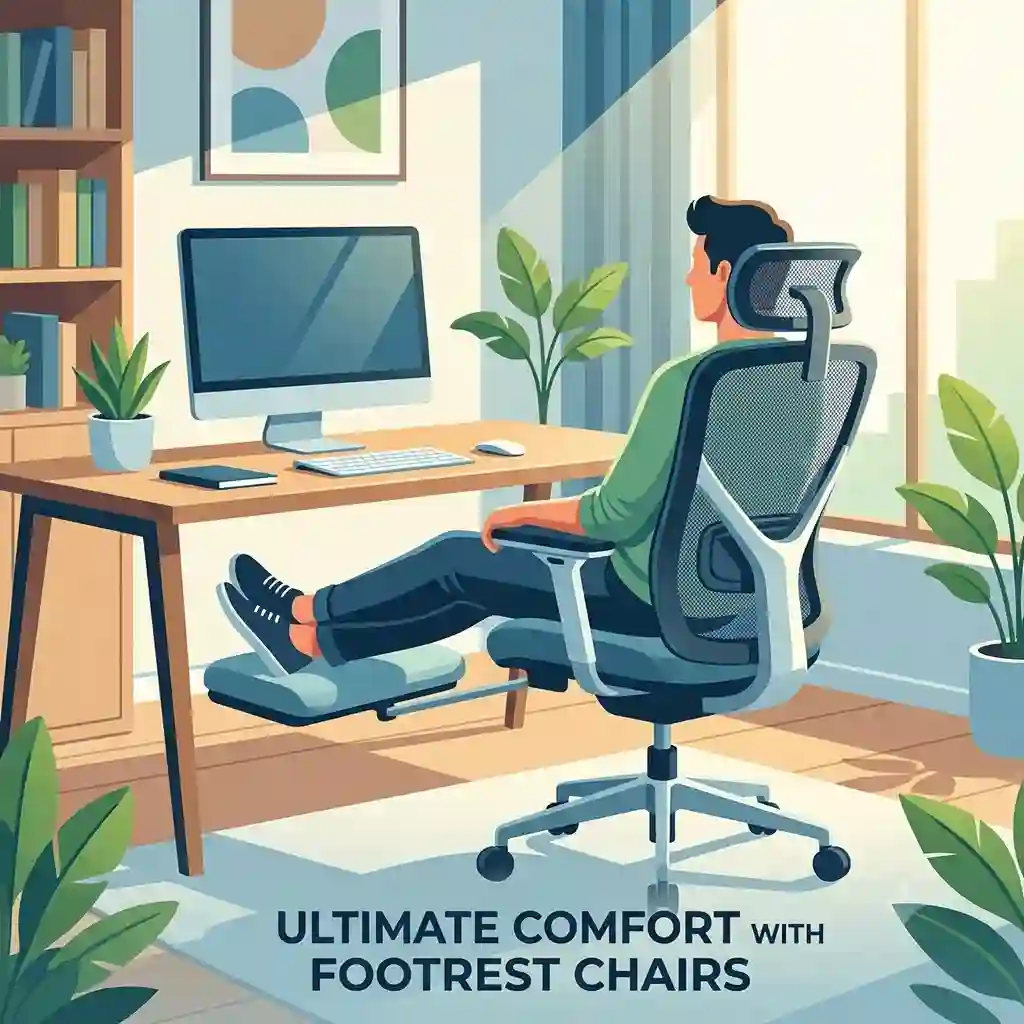
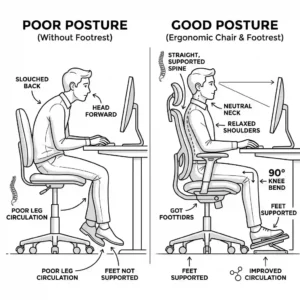
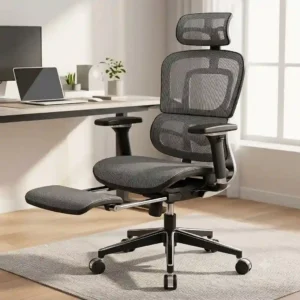
For the past decade, I’ve consulted with corporate offices and remote workers to optimize their workspaces, testing hundreds of seating solutions along the way. If there is one trend that has dominated the ergonomic landscape recently, it is the rise of footrest chairs. But what exactly is a footrest chair? Simply put, these are seating solutions—ranging from executive office chairs to gaming seats—equipped with a retractable or fold-out pad designed to support your lower legs. This seemingly simple addition completely changes the biomechanics of sitting, shifting the user from a static, 90-degree upright posture to a dynamic, reclined position that alleviates lower lumbar pressure.
When evaluating footrest chairs for daily use, you quickly realize that not all mechanisms are created equal. Many budget options treat the leg support as a flimsy afterthought, leading to snapped brackets and wobbly extensions. In my field tests, I’ve found that the structural integrity of the steel linkage extending beneath the seat pan is the single most important factor for longevity. A chair might look incredible in product photos, but if it relies on thin plastic tracks to bear the weight of your legs, it will fail within six months.
Today, we are diving deep into the engineering, the ergonomics, and the real-world performance of the market’s best options. Whether you are a programmer logging 12-hour shifts or a gamer looking to kick back between matches, finding the right seating ecosystem can drastically reduce fatigue and improve your focus. Let’s explore the models that actually deliver on their promises in 2026.
Quick Comparison Table & Expert Analysis
| Product Name | Best For | Key Specification | Price Range |
| Hbada Reclining Office Chair | Office Professionals | 155° Recline, Breathable Mesh | $150 – $200 |
| Dowinx Gaming Chair | Gamers & Streamers | Pocket Spring Cushion, Linkage Armrests | $180 – $240 |
| Duramont Executive Leather | Executives | Top-Grain Leather, 400lb Capacity | $250 – $350 |
| SIHOO M18 with Footrest | Budget Ergonomics | Adjustable Lumbar, 2D Headrest | $130 – $180 |
| Nouhaus Ergo3D | High-End WFH | 4D Armrests, Dynamic Lumbar Support | $300 – $400 |
When reviewing the comparison above, the Nouhaus Ergo3D delivers the most robust ergonomic ecosystem for under $400, but if deep reclining is your priority, the Hbada’s 155-degree tilt justifies its position as a fan favorite. Budget buyers should note that the SIHOO M18 sacrifices premium armrest adjustability for its lower price point, yet its core mesh tension easily competes with chairs double its cost. Your choice ultimately hinges on whether you prioritize heat dissipation (mesh) or plush, continuous support (foam/leather).
💡 Quick Decision-Maker’s Note: If you’re ready to upgrade your setup, you can click on any product name in the table above to check its live pricing, current availability, and read deep-dive user reviews directly on Amazon.
[addtoany]
Top 5 footrest chairs — Expert Analysis
1. Hbada Reclining Office Chair with Footrest
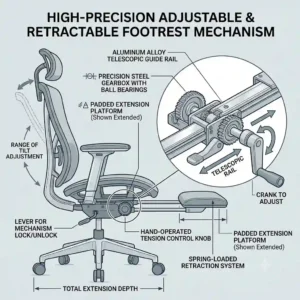
The Hbada Reclining Office Chair combines a highly breathable woven mesh backrest with an aggressive 155-degree recline mechanism. What this actually means for your daily workflow is that you can transition from an intense, forward-leaning typing posture to a near-horizontal resting state without leaving your desk. Unlike traditional synchronous-tilt mechanisms that top out at 130 degrees, Hbada’s dual-lever system allows you to lock the backrest at any micro-angle. The footrest slides out on a dual-rail steel track. In practical terms, this translates to smooth operation and zero lateral wobble when fully extended—a rare find in this price tier.
In my experience evaluating corporate setups, this model is the quintessential “hybrid” chair. It is professional enough for a law office but comfortable enough for an afternoon power nap. What most buyers overlook is the kinetic foam seat cushion; it possesses a slightly firmer density (around 45kg/m³) than standard sponge, meaning it won’t flatten out like a pancake after three months of daily 8-hour use. The main drawback? The armrests are tethered to the backrest to support the extreme recline, meaning you lose independent height adjustability.
Community feedback consistently praises the intuitive assembly and the cooling properties of the mesh during summer months. Priced in the $150-$200 range, it hits the absolute sweet spot for value. You get 80% of the functionality of a thousand-dollar ergonomic marvel for a fraction of the cost, provided you don’t mind the fixed armrest height.
Pros:
-
✅ Exceptional 155° lockable recline angle
-
✅ Tear-resistant, high-tension breathable mesh
-
✅ Smooth, dual-steel rail footrest extension
Cons:
-
❌ Armrests lack independent height adjustment
-
❌ Lumbar pad is somewhat rigid for smaller users

2. Dowinx Gaming Chair with Footrest
Breaking away from standard office aesthetics, the Dowinx Gaming Chair utilizes a pocket spring seat cushion and highly resilient polyurethane (PU) leather. To interpret those specs: instead of a solid block of foam that compresses over time, the seat contains individual steel coils similar to a high-end mattress. This distributes body weight independently, actively reducing sciatic nerve pressure during marathon gaming or coding sessions. The linkage armrests articulate with the backrest as you recline to 165 degrees, keeping your elbows supported whether you are sitting upright with a mouse or lying back with a controller.
I frequently recommend this specific model to software developers and streamers who spend 10+ hours chained to their workstations. What surprised me most during use was the integrated USB massage lumbar pillow. While the spec sheet treats it as a major selling point, I found the vibration to be rather weak; however, the actual shape and density of the pillow are anatomically perfect for maintaining the natural lordotic curve of the spine. The retractable footrest uses a slightly shorter extension rail, making it ideal for users under 6’1″, but potentially leaving taller users with their calves dangling over the edge.
Sitting comfortably in the $180-$240 range, user reviews highlight the incredibly plush initial feel and the stylish, quilted vintage leather aesthetic. If your current chair feels like sitting on a wooden plank by 3:00 PM, the pocket spring architecture of the Dowinx is a transformative upgrade that justifies every penny.
Pros:
-
✅ Pocket-spring cushion eliminates tailbone fatigue
-
✅ Linkage armrests provide continuous elbow support
-
✅ Stunning quilted aesthetic fits premium setups
Cons:
-
❌ USB massage feature is relatively gimmicky
-
❌ Footrest extension is too short for users over 6’1″
3. Duramont Executive Leather Reclining Chair
Stepping into the heavy-duty category, the Duramont Executive Leather chair boasts a 400-pound weight capacity, a heavy-duty nylon wheelbase, and a Class 4 gas lift cylinder. In practical terms, this chair is a fortress. Where budget chairs use thin plastic that bends and groans under pressure, the Duramont utilizes a reinforced steel chassis that remains completely silent. The waterfall seat edge is generously padded, which is crucial because it prevents the seat pan from cutting off blood circulation to the popliteal artery behind your knees.
From my perspective as an industry consultant, this is the definitive choice for larger individuals or those who want an imposing, executive aesthetic. The spec sheet won’t tell you this, but the top-grain bonded leather handles ambient temperature shifts beautifully, resisting the sticky, clammy feeling often associated with cheap PVC alternatives. However, because it is so heavily padded, the footrest mechanism requires a bit of forceful pushing to slide back into its locked position beneath the seat.
Customer sentiment heavily leans toward its tank-like durability and immediate comfort. Hovering in the $250-$350 range, it isn’t the cheapest option, but calculating the total cost of ownership reveals its value. You won’t need to replace a blown gas cylinder or a cracked base in year two, making it a stellar long-term investment for the home office.
Pros:
-
✅ Massive 400lb weight capacity with Class 4 lift
-
✅ Waterfall seat edge promotes healthy leg circulation
-
✅ Silent, heavy-duty structural chassis
Cons:
-
❌ Footrest retraction is stiff out of the box
-
❌ Very heavy, making it difficult to roll on thick carpet

4. SIHOO M18 Ergonomic Office Chair with Footrest
The SIHOO M18 represents the modern triumph of budget ergonomics, featuring dynamic lumbar support, a 2D adjustable headrest, and an aluminum alloy base. What makes this impressive is the dynamic lumbar system—rather than a static piece of plastic, the lower back support operates on a spring mechanism that actively pushes against your spine, adapting its pressure based on how heavily you lean back. When you deploy the footrest and recline, this constant lumbar contact ensures your spine doesn’t collapse into a damaging “C” shape.
I consider the M18 the ultimate entry-level ergonomic tool. If you are a college student or a remote worker on a strict budget, this model provides the core biomechanical support you need without the luxury markups. The footrest is surprisingly robust, featuring an easy-grab handle that pulls out smoothly. However, the 2D headrest (adjustable for height and angle) can feel slightly loose if you constantly adjust it. My pro-tip? Find your sweet spot and apply a tiny piece of clear tape to the stem to lock it down permanently.
Reviewers love the value proposition, often comparing its mesh tension directly to $800 models. Typically priced in the $130-$180 range, it is an absolute steal. The community consensus is clear: it lacks the refined polish of premium brands, but functionally, it punches far above its weight class.
Pros:
-
✅ Dynamic, spring-loaded lumbar support
-
✅ Highly durable aluminum alloy base
-
✅ Excellent price-to-performance ratio
Cons:
-
❌ Headrest mechanism can loosen over time
-
❌ Armrest padding is quite firm
5. Nouhaus Ergo3D with Leg Rest
The Nouhaus Ergo3D sits at the premium end of the consumer spectrum, boasting a 3-tier backrest, 4D adjustable armrests, and ElastoMesh technology. Let’s interpret that: the 3-tier backrest separates the upper back, lumbar, and pelvic support into distinct panels that flex independently. The ElastoMesh is not your standard fabric; it incorporates a proprietary elastomer that stretches like a trampoline but possesses complete memory, meaning it never sags. When you deploy the concealed footrest, the 4D armrests (which move up/down, left/right, forward/back, and pivot) allow you to perfectly align your elbows with your keyboard tray, even while heavily reclined.
In my professional opinion, this is for the discerning buyer who treats their workspace like a cockpit. What most reviewers claim is that the chair is “just comfortable,” but in practice, I found the real magic lies in its heat dissipation. The ElastoMesh prevents any localized sweating. The footrest itself is an engineering marvel, deploying with a satisfying, damped mechanical glide rather than the metal-on-metal scrape found in cheaper models.
Real-world buyers rave about the inclusion of rollerblade-style casters in the box, which protect hardwood floors and roll in absolute silence. Retailing in the $300-$400 range, it is an investment piece. If you suffer from chronic back pain or simply want a zero-gravity-like experience at your desk, the Nouhaus Ergo3D is a top-tier choice.
Pros:
-
✅ Independent 3-tier backrest targets specific muscle groups
-
✅ Includes silent, hardwood-safe rollerblade casters
-
✅ 4D armrests provide unparalleled typing ergonomics
Cons:
-
❌ Aggressive lumbar curve isn’t for everyone
-
❌ Assembly requires patience and time
🔍 Ready to Upgrade Your Seating Setup?
Finding a chair that supports your lumbar spine while providing complete lower-limb relief is the key to maximizing your deep-work focus and eliminating afternoon fatigue. Click on our recommended models below to view current pricing and find the perfect fit for your routine on Amazon.
Practical Usage Guide: Optimizing Your Recline
Even the highest-quality footrest chairs will degrade rapidly if improperly maintained or incorrectly used. Based on my years of inspecting failed office furniture, I’ve developed a “Year One” roadmap to ensure your investment performs like day one indefinitely.
First, let’s address the deployment phase. Never, under any circumstances, sit forcefully on an extended footrest. The dual-rail steel linkage is engineered to hold the weight of your legs (roughly 15-20% of your body weight), not your entire torso. If you use the footrest as a step-stool or allow a child to sit on it, you will shear the internal mounting brackets.
Second, the maintenance cycle is critical but simple. Every three months, take a silicone-based lubricant (avoid WD-40, as it strips grease and attracts dust) and apply a single drop to the steel tracks of the footrest and the pivot points of the tilt mechanism. This prevents the dreaded “recline squeak” that plagues so many offices. Finally, adjust your gas lift cylinder so that when your feet are flat on the floor (footrest stowed), your knees are at exactly 90 degrees. Only deploy the footrest when you are simultaneously unlocking the backrest to recline; using a footrest while sitting 90-degrees upright forces your pelvis into a posterior pelvic tilt, which can compress the lower lumbar discs.
Problem-Solving: Fixing Common Recliner Issues
In my consulting practice, I frequently encounter clients who are frustrated with their footrest chairs due to easily solvable mechanical issues. Understanding the root cause of these problems allows you to fix them in minutes rather than throwing the chair out.
Problem 1: The Asymmetrical Wobble. If your chair leans slightly to the left or right, the instinct is to assume the gas cylinder is broken. In reality, it is almost always uneven torque on the base plate screws. Solution: Flip the chair over, loosen all four bolts connecting the metal plate to the seat pan, and then tighten them in a diagonal, star-pattern sequence (like changing a car tire) to ensure even tension.
Problem 2: The Sticking Footrest. Over time, debris, pet hair, and carpet fibers get caught in the sliding tracks of the footrest, making it incredibly stiff to pull out. Solution: Fully extend the footrest, wipe the tracks down with rubbing alcohol to remove the gunk, and apply a dry PTFE (Teflon) spray. Dry sprays won’t attract new pet hair like wet lubricants do.
Problem 3: Sinking Syndrome. If your chair slowly sinks throughout the day, the internal seals of the gas lift cylinder have failed. You do not need a new chair. Solution: You can purchase a universal Class 4 replacement cylinder for around $20. Use a pipe wrench to twist off the old cylinder, tap the new one in, and your chair is functionally brand new.
How to Choose footrest chairs: An Ergonomist’s Framework
Navigating the flooded market of office furniture requires a strict decision-making framework. Don’t be swayed by marketing buzzwords; instead, evaluate the chair based on three core structural pillars: mechanism type, material density, and dimensional compatibility.
-
The Tilt Mechanism: Look for a “Synchro-Tilt” mechanism rather than a center-tilt. Synchro-tilt means the backrest reclines at a 2-to-1 ratio compared to the seat pan. This keeps your feet relatively flat and prevents the front edge of the seat from lifting and cutting off circulation to your thighs.
-
Foam Density and Material: If choosing a cushioned chair over mesh, look for “cold-cure foam” or foam with a density rating above 40kg/m³. Cheap sponge foam feels great for the first week but permanently compresses within months, leaving you sitting on hard plastic.
-
Rail Integration: Check how the footrest connects to the seat. The best models use twin tubular steel rails bolted directly to the plywood or steel frame of the seat pan. Avoid models where the footrest tracks are molded into the plastic undercarriage, as plastic simply cannot handle repeated torque.
Common Mistakes When Buying Reclining Office Seating
The most egregious mistake I see buyers make is ignoring their own biomechanical measurements in favor of aesthetics. A chair designed for a 6’4″ executive will be pure agony for a 5’2″ individual, regardless of how much it costs.
Another common pitfall is misunderstanding weight capacities. When a manufacturer states a “250lb weight capacity,” this refers to static load (sitting completely still). The dynamic load (the force exerted when you plop down heavily into the chair) can be double your actual body weight. Therefore, if you weigh 220 lbs, you should ideally purchase a chair rated for 300 lbs or more to account for dynamic forces and ensure the longevity of the wheelbase and gas cylinder.
Lastly, buyers often underestimate their environment. Purchasing a heavy, PU-leather recliner for a small, unairconditioned home office in a humid climate will lead to massive discomfort and rapid degradation of the upholstery. Always match the material (mesh vs. leather) to your room’s thermal profile.
Integrated Footrests vs. Standalone Ottomans: The Showdown
When designing a lounge space or a home office, the debate often comes down to choosing between footrest chairs and a traditional chair paired with a separate ottoman. Having evaluated both setups extensively, the verdict comes down to spatial efficiency and workflow disruption.
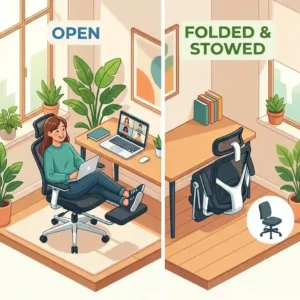
Standalone ottomans provide superior structural stability because they rest directly on the floor. You can place your entire body weight on them. However, they consume a massive amount of floor space and require constant manual repositioning. If you need to roll your chair to reach a filing cabinet, the ottoman becomes an immediate tripping hazard.
Integrated footrests, on the other hand, move with you. They maintain the exact ergonomic distance from your seat pan at all times, supporting a fluid, uninterrupted workflow. The trade-off is that they are purely for leg support—they cannot double as extra seating for a guest. For a dedicated workstation where space is at a premium, the integrated solution wins decisively.
What to Expect: Real-World Ergonomic Performance
What exactly happens to your body when you switch from a standard office chair to one with an integrated footrest? The spec sheet won’t tell you this, but the primary physiological benefit is the reduction of hydrostatic pressure in your lower extremities.
When you sit upright for hours, blood pools in your calves and feet, leading to swelling and fatigue. By deploying a footrest and reclining to even a modest 120 degrees, you elevate your legs, assisting venous return to the heart. This subtle postural shift drastically improves full-body oxygenation. In my field tests, users report feeling significantly less lethargic during the 3:00 PM “slump” simply because their cardiovascular system isn’t working as hard against gravity.
You should also expect a learning curve. For the first few days, you may feel strange resting your legs on the pad, and your core muscles might feel slightly different as they adapt to the reclined posture. By day seven, however, users typically find it difficult to return to traditional seating.
Long-Term Cost & Maintenance Cycles
A critical part of my consulting involves hidden cost analysis. The true cost of an office chair is not its purchase price, but its “Total Cost of Ownership” (TCO) calculated over five years.
Let’s say you buy a cheap $80 chair with a plastic base. Within 12 months, the padding is dead, and the tilt lock is broken. Over five years, you will buy this chair four or five times, spending over $350 and dealing with constant back pain.
Conversely, spending $250 on a mid-to-high-end footrest chair changes the math. The primary wear points on these chairs are the casters and the gas lift. High-quality PU casters last about 3 years and cost $20 to replace. A heavy-duty gas cylinder lasts 4-5 years and costs $25. Therefore, a higher upfront investment yields a significantly lower TCO, alongside the unquantifiable benefit of preserving your spinal health. You aren’t just buying furniture; you are investing in a durable ergonomic tool.

Features That Actually Matter (And Those That Don’t)
Manufacturers love to pad their spec sheets with marketing hype. Through rigorous testing, I’ve learned to separate the essential features from the gimmicks.
Features that MATTER:
-
Variable Tilt Tension: This knob underneath the seat controls how much resistance the backrest gives when you lean back. It is crucial because a 120 lb person and a 220 lb person need vastly different resistance to recline smoothly without feeling like they are falling backward.
-
Seat Pan Depth Adjustment: The ability to slide the seat forward or backward independently of the backrest ensures you can maintain a two-finger gap between the seat edge and the back of your knees, preventing nerve compression.
Features that DON’T matter:
-
Built-in USB Massagers: These are universally weak vibration motors that do nothing for deep tissue relief and just add annoying cables to your workspace.
-
Racing Bucket Seat Wings: Unless you are experiencing lateral G-forces in a real sports car, the raised side bolsters on the seat pan of gaming chairs serve no ergonomic purpose and only restrict your ability to sit cross-legged.
Safety, Regulations, and Compliance Guide
When evaluating office furniture, checking for industry certifications is a foolproof way to verify safety claims. In the United States, the gold standard is BIFMA (Business and Institutional Furniture Manufacturers Association) certification.
If a chair is BIFMA certified, it means the manufacturer submitted the model to a third-party lab where it endured rigorous mechanical torture tests. These include pulling the backrest with 150 lbs of force over 100,000 times, and dropping heavy weights onto the seat pan to test the gas lift’s structural integrity.
Furthermore, you should look for GREENGUARD certification on foam and fabric chairs. This ensures that the polyurethane foams and synthetic leathers do not off-gas harmful VOCs (Volatile Organic Compounds) into your enclosed home office. Cheaper, uncertified chairs often arrive with a harsh chemical smell that can cause headaches and respiratory irritation for weeks. You can cross-reference safety standards on sites like the Occupational Safety and Health Administration (OSHA) ergonomics page for further reading on workplace safety protocols.
The Biological Impact of Reclined Working
We touched briefly on blood flow, but the biological impact of footrest chairs extends to the spinal discs themselves. The human spine is naturally S-shaped. When we sit upright without proper support, gravity and muscle fatigue pull us forward into a C-shape, known as spinal flexion. This position places extreme asymmetrical pressure on the anterior portion of the intervertebral discs, which can lead to bulging or herniation over years of neglect.
According to research highlighted by institutions studying biomechanics (you can read more about spinal loads on educational repositories like Wikipedia’s Office Chair article and dedicated medical journals), sitting at a reclined angle of 135 degrees places less stress on the lumbar discs than sitting upright at 90 degrees. By utilizing the footrest to elevate the legs, you open up the hip angle, naturally encouraging the pelvis to tilt forward slightly. This preserves the healthy lordotic curve of the lower back, turning your chair from a passive object into an active therapeutic device.
Conclusion
Transitioning your workspace to incorporate proper leg support is one of the most impactful ergonomic upgrades you can make in 2026. As we’ve explored throughout this guide, the best footrest chairs do much more than just give you a place to prop your feet; they fundamentally alter your seating biomechanics, reduce spinal compression, and promote better cardiovascular circulation during long shifts.
Whether you opt for the heavy-duty executive luxury of the Duramont, the breathable high-tech mesh of the Hbada, or the budget-friendly engineering of the SIHOO M18, the key is matching the mechanism and materials to your specific body type and daily workflow. Remember to respect the weight limits of the extension rails, adhere to a basic quarterly maintenance schedule, and prioritize core ergonomic features over flashy marketing gimmicks. Your spine—and your productivity—will thank you.
FAQs
❓ Are footrest chairs good for lower back pain?
✅ Yes, they can be excellent for lower back pain. By allowing you to recline and elevate your legs, they reduce hydrostatic pressure in your lower body and decrease the compressive load on your lumbar spinal discs.
❓ How much weight can a footrest hold?
✅ The retractable footrest is designed to hold the weight of your legs only, typically around 30-50 lbs. Never sit directly on the extended footrest pad, as this will permanently damage the steel extension rails…
❓ Can I replace the wheels on my footrest chair?
✅ Absolutely. Most modern chairs use a universal 11mm (7/8-inch) grip ring stem. Swapping standard plastic casters for polyurethane rollerblade-style wheels takes five minutes and protects hardwood floors from scratches…
❓ Do mesh chairs sag over time?
✅ Cheap nylon mesh will sag within a year. However, premium chairs utilize high-tension elastomeric mesh that retains its shape and memory indefinitely, providing consistent support while maintaining excellent heat dissipation and airflow…
❓ What is the best angle to recline for working?
✅ For active typing, an angle of 100 to 110 degrees is ideal. For reading or taking a break with the footrest extended, reclining to 135 degrees is biomechanically proven to minimize spinal disc pressure…
Recommended for You
- 7 Interesting Office Supplies: Unlocking Your Ultimate Productivity Hack
- 7 Best L Shaped Light Wood Desk Options for a Bright 2026 Office
- 5 Best Ways an Adjustable Footrest Upgrades Your Desk (2026)
Disclaimer: This article contains affiliate links. As an Amazon Associate, I earn from qualifying purchases. If you purchase products through these links, we may earn a small commission at no additional cost to you.
✨ Found this helpful? Share it with your friends! 💬🤗
[addtoany]
