

Let’s be honest for a second. Take a look at how you’re sitting right now. Are you hunched over your laptop, shoulders rounded, neck craned down? I’ve been there, and I call it the “laptop hunch.” It’s the default posture for millions of us, and it’s terrible for our bodies. The problem isn’t just the laptop; it’s that the screen and keyboard are fused together, forcing a compromise. That’s where a macbook computer stand comes in. It’s not just a chunk of aluminum; it’s arguably the most important ergonomic investment you can make for your desk.
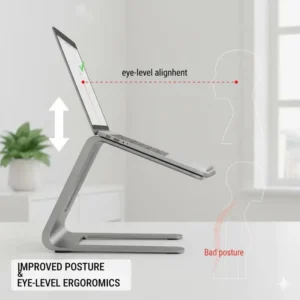
A good macbook computer stand does three things brilliantly: it raises your screen to eye level (goodbye, neck pain), it improves airflow to keep your machine cool, and it instantly declutters your desk, giving it a clean, professional aesthetic. Whether you’re using a powerful MacBook Pro for video editing or a sleek MacBook Air for writing, finding the right apple laptop stand can completely change your workday.
✨Was this helpful? Spread the word! 🚀
[addtoany]
But not all stands are created equal. Some are fixed, some are adjustable, and some are built for an entirely different purpose (like vertical stands). To help you navigate the options, I’ve broken down the key alternatives to a dedicated macbook computer stand.
Stand vs. The Alternatives: A Quick Look
| Approach | Primary Benefit | Key Drawback | Best For… |
| Dedicated Macbook Stand | Ergonomics & Airflow | Requires external keyboard/mouse | All-day desk users, professionals |
| Stack of Books | Free | Unstable, blocks airflow, looks messy | A temporary, 5-minute fix |
| Laptop Cooling Pad | Active Cooling (Fans) | Often bulky, requires power (USB) | Gamers, heavy rendering tasks |
| Monitor Arm (Varies) | Ultimate Adjustability | Expensive, requires desk mounting | Power users, standing desk setups |
Quick Comparison: Top 7 Macbook Computer Stands for 2025
Here’s a quick glance at the top products we’ll be diving into. Each one serves a different user, from the minimalist to the digital nomad.
| Product | Type | Material | Best For |
| Rain Design mStand | Fixed | Aluminum | Aesthetics & Stability |
| Nulaxy Laptop Stand | Adjustable (Angle & Height) | Aluminum | Ergonomic Customization |
| Twelve South BookArc | Vertical | Aluminum / Wood | Clamshell Mode (Space-Saving) |
| Nexstand Laptop Stand K2 | Portable (Folding) | Reinforced Nylon | Travelers & Digital Nomads |
| Lamicall Laptop Stand | Fixed | Aluminum | Budget-Friendly Simplicity |
| Twelve South Curve SE | Fixed | Aluminum | Elegant, Minimalist Setups |
| ObVus Solutions Tower Stand | Adjustable (Vertical) | Aluminum | Standing Desk Conversion |
Top 7 Macbook Computer Stands: Expert Analysis
I’ve spent countless hours testing, researching, and sifting through user feedback to identify the products that actually deliver. We’re looking at build quality, stability, ergonomic design, and real-world performance.
1. Rain Design mStand
If you’ve ever looked up “best macbook stand,” you’ve seen this one. The Rain Design mStand is an icon for a reason. It’s crafted from a single, solid piece of sand-blasted aluminum that perfectly matches the MacBook’s finish.
-
Detailed Specifications:
-
Material: Single-piece aluminum alloy
-
Compatibility: All MacBooks (13-inch to 16-inch)
-
Dimensions: 10″ (W) x 9″ (D) x 5.9″ (H)
-
Weight: 3 lbs
-
Elevation: Lifts screen 5.9 inches
-
-
Customer Review Analysis: Users consistently praise its rock-solid stability. “It feels like it was carved from the same block as my MacBook,” one review notes. The main critique? It’s fixed. You can’t adjust the height or angle, so you have to be happy with the 5.9-inch lift it provides.
-
Warranty Information: Rain Design typically offers a 1-year limited warranty, covering manufacturing defects.
-
Professional Applications: This is the gold standard for design studios, co-working spaces, and any professional who values a clean, static, and beautiful setup.
-
Pros/Cons Analysis:
-
✅ Pros: Unmatched stability, premium build, perfect Apple aesthetic, excellent heat dissipation.
-
❌ Cons: Zero adjustability, relatively heavy, premium price point.
-
2. Nulaxy Laptop Stand
For those who value flexibility over a fixed aesthetic, the Nulaxy Laptop Stand is a top contender. This adjustable macbook stand is a workhorse, allowing you to fine-tune both the height and the angle of your laptop.
-
Detailed Specifications:
-
Material: Aluminum alloy
-
Compatibility: Laptops from 10 to 17.3 inches
-
Dimensions: Varies (collapsible)
-
Weight: 2.1 lbs
-
Elevation: Adjustable from ~2 inches to 13 inches (model dependent)
-
-
Customer Review Analysis: The overwhelming positive feedback centers on its versatility. Users love that they can dial in the exact eye level they need. Some reviewers mention that the adjustment joints can be very stiff, which is actually a pro (it means it won’t wobble) but a con when you first set it up.
-
Warranty Information: Nulaxy generally provides a 1-year warranty and responsive customer service.
-
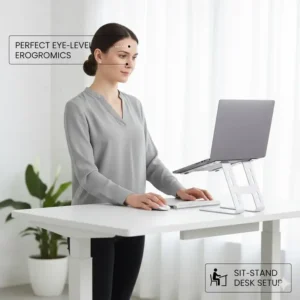
Professional Applications: Ideal for shared workspaces, hot-desking, or individuals who switch between sitting and standing (with a converter). It’s also great for using a MacBook as a secondary display next to a large monitor.
-
Pros/Cons Analysis:
-
✅ Pros: Highly adjustable (height and angle), very sturdy at any position, folds down for storage, good value.
-
❌ Cons: Joints can be stiff to adjust, less minimalist than fixed stands.
-
3. Twelve South BookArc
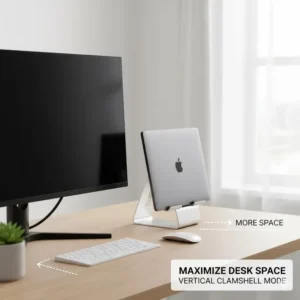
The Twelve South BookArc tackles a completely different problem. This is a vertical macbook computer stand designed for users who primarily work in “clamshell mode”—that is, with their MacBook closed and connected to an external monitor, keyboard, and mouse.
-
Detailed Specifications:
-
Material: Aluminum (in Silver or Space Gray) or genuine Wood (Birch or Walnut)
-
Compatibility: Comes with different silicone inserts to fit specific MacBook Air/Pro models.
-
Dimensions: 8.5″ (D) x 3.6″ (W) x 2.2″ (H)
-
Weight: ~0.35 lbs (Aluminum)
-
-
Customer Review Analysis: Customers are obsessed with the space-saving aspect. “It gave me half my desk back,” is a common refrain. The design is elegant and the included cable-catch feature is a thoughtful touch. The main complaint is that you must use the correct silicone insert for your specific MacBook model, or it will be too loose or too tight.
-
Warranty Information: Twelve South offers a standard 1-year warranty.
-
Professional Applications: This is the ultimate solution for “desktop replacement” users. Think video editors, coders, and stock traders who use their MacBook as the “brain” for a multi-monitor setup.
-
Pros/Cons Analysis:
-
✅ Pros: Incredible space-saver, beautiful premium design (especially the wood version), integrated cable management.
-
❌ Cons: Only for closed-clamshell use, model-specific inserts can be annoying.
-
4. Nexstand Laptop Stand K2
What about when you’re not at your desk? The Nexstand Laptop Stand K2 is built for portability. It’s a skeletal frame made of high-strength nylon that folds down into a compact carrying sleeve.
-
Detailed Specifications:
-
Material: Reinforced industrial-grade nylon
-
Compatibility: Laptops 11.6 inches and up
-
Dimensions: Folds to 14″ x 1.5″ x 1.5″
-
Weight: 8 ounces (0.5 lbs)
-
Elevation: 8 adjustable height settings (from 6 to 12.6 inches)
-
-
Customer Review Analysis: People are consistently shocked by how light it is, yet how sturdy it feels. “I throw this in my backpack and forget it’s there,” said one review. It’s a favorite among digital nomads and students. Some users note it can feel slightly less stable than a solid aluminum stand, especially if you’re a heavy typer (but you should be using an external keyboard anyway!).
-
Warranty Information: Typically comes with a 1-year warranty.
-
Professional Applications: The clear choice for remote workers, coffee shop warriors, students, and anyone who travels frequently for business.
-
Pros/Cons Analysis:
-
✅ Pros: Extremely lightweight and portable, 8 levels of height adjustment, surprisingly sturdy, very affordable.
-
❌ Cons: Not as aesthetically “Apple” as aluminum, can wobble slightly on unstable surfaces.
-
5. Lamicall Laptop Stand
Sometimes, you just want something simple that works. The Lamicall Laptop Stand is the “no-frills” budget champion. It’s a fixed-height riser with a clean, C-shaped design that gets the job done without breaking the bank.
-
Detailed Specifications:
-
Material: Aluminum alloy
-
Compatibility: Laptops 10 to 17 inches
-
Dimensions: 9.4″ (W) x 8.7″ (D) x 5.4″ (H)
-
Weight: 2.2 lbs
-
Elevation: Lifts screen 5.4 inches
-
-
Customer Review Analysis: This stand has a mountain of positive reviews, all saying the same thing: “It’s simple, it’s sturdy, and it does what it promises.” It’s praised for its easy assembly (just three pieces) and the protective rubber pads. Like the Rain Design mStand, its only real downside is the lack of adjustability.
-
Warranty Information: Lamicall offers lifetime support and often a 1-year (or more) warranty.
-
Professional Applications: Perfect for home offices, students, or as a “second” stand for another part of the house. It’s a fantastic entry-level
macbook riser. -
Pros/Cons Analysis:
-
✅ Pros: Excellent value for the price, very stable, simple minimalist design, good airflow.
-
❌ Cons: Fixed height (5.4 inches), assembly required (though very simple).
-
6. Twelve South Curve SE
The Twelve South Curve SE is like the elegant cousin to the mStand. It shares a fixed-height, ergonomic-lift philosophy but with a more modern, minimalist “curved” design that uses two separate arms instead of a solid tray.
-
Detailed Specifications:
-
Material: Aluminum
-
Compatibility: All MacBooks and laptops
-
Dimensions: 10.3″ (W) x 8.7″ (D) x 5.8″ (H)
-
Weight: 1.43 lbs
-
Elevation: Lifts screen 5.8 inches
-
-
Customer Review Analysis: Users love the look. It’s incredibly minimalist and allows for maximum airflow since most of the laptop’s bottom is exposed. “It looks less like a ‘stand’ and more like part of the desk,” one designer noted. The anti-slip silicone pads on the arms are also highly praised for gripping the MacBook securely.
-
Warranty Information: Standard 1-year warranty from Twelve South.
-
Professional Applications: This is a top choice for style-conscious professionals, minimalist desk setups, and anyone who wants to maximize airflow for a hard-working MacBook Pro.
-
Pros/Cons Analysis:
-
✅ Pros: Beautiful, elegant, and minimal design, fantastic airflow and cooling, very stable.
-
❌ Cons: Fixed height, premium price for a non-adjustable stand.
-
7. ObVus Solutions Laptop Tower Stand
Finally, we have the heavyweight champion of adjustability. The ObVus Solutions Laptop Tower Stand isn’t just a stand; it’s a “tower” that can raise your MacBook from desk level all the way up to 21 inches, high enough for most people to use while standing.
-
Detailed Specifications:
-
Material: Solid aluminum
-
Compatibility: Laptops 10 to 17 inches
-
Dimensions: Folds flat to 10.6″ x 9.6″ x 2″
-
Weight: 3.9 lbs
-
Elevation: Fully adjustable from 2.1 to 21 inches
-
-
Customer Review Analysis: Reviewers are blown away by the height this thing can achieve. “It saved me from buying a full standing desk,” is a common sentiment. It’s praised for its tank-like build and smooth adjustment. The main negative? It’s heavy and bulky, making it a purely stationary solution despite its ability to fold.
-
Warranty Information: ObVus Solutions typically offers a 1-year warranty.
-
Professional Applications: This is the perfect
stand for macbookusers who want to transition between sitting and standing without buying a new desk. It’s a robust, all-in-one ergonomic solution. -
Pros/Cons Analysis:
-
✅ Pros: Unmatched height adjustment (up to 21 inches), allows for standing, incredibly solid build, folds flat for storage.
-
❌ Cons: Heavy and bulky, significant desk footprint, premium price.
-
✨ Don’t Miss These Exclusive Deals! 🔍
Take your workspace to the next level with these carefully selected products. Click on any highlighted item to check current availability and transform your desk into an ergonomic powerhouse!
💬 Just one click – help others make better buying decisions too!😊
[addtoany]

The Ergonomic Imperative: Why a Macbook Computer Stand Is Non-Negotiable
Let’s dig into the why. For years, I just dealt with the neck pain. I’d finish a long day of writing and feel that familiar, dull ache at the base of my skull. The problem is simple: when your laptop is flat on the desk, you must look down.
This forward-head posture places significant strain on your cervical spine. In fact, for every inch your head juts forward, it adds about 10 pounds of pressure on your spine. A simple macbook computer stand corrects this instantly by raising the screen to your natural eye level. This allows you to sit back, align your spine, and engage your core, rather than hunching over. For more on proper office ergonomics, the U.S. Occupational Safety and Health Administration (OSHA) provides excellent guidelines on monitor placement, which directly apply here.
Ergonomic Benefits vs. Traditional Setup
| Metric | Traditional Setup (Flat on Desk) | With a Macbook Computer Stand |
| Eye Level | Forces downward gaze (approx. 30-45°) | Aligns with top 1/3 of screen |
| Neck Strain | High (constant flexion) | Neutral / Low |
| Shoulder Posture | Rounded forward | Pulled back and relaxed |
| Wrist Angle | Poor (requires external keyboard) | Excellent (with external keyboard) |
| Overall Comfort | Low (leads to pain in 1-2 hours) | High (sustainable for 8+ hours) |
More Than Just Height: The Hidden Perks of a Good Stand
While ergonomics is the number one reason to get a mac book computer stand, the benefits don’t stop there. I quickly found that the secondary perks are just as valuable.
💨 Better Cooling and Performance
MacBooks, especially the powerful Pro models, are thermodynamic machines. When they get too hot, they “throttle” performance—that is, they slow down the processor to protect the components. Placing your MacBook flat on a desk suffocates it, trapping heat.
A macbook riser elevates the entire machine, allowing for 360-degree airflow. This passive cooling is often all your MacBook needs to run faster and longer without its fans sounding like a jet engine.
🧹 Instant Desk Organization
A cluttered desk leads to a cluttered mind. A stand raises your laptop off the desk surface, creating a new, usable space underneath. This is the perfect spot to slide your external keyboard, stow your notebook and pen, or place a hard drive. It’s a simple change that makes your entire workspace feel more intentional and organized.
Feature Comparison: Cooling & Space
| Stand Type | Passive Cooling | Active Cooling (Fans) | Space Saved |
| Fixed (e.g., mStand) | Excellent | No | Good (space underneath) |
| Fixed (e.g., Curve) | Maximum | No | Good (space underneath) |
| Adjustable | Very Good | No | Varies (often less space) |
| Vertical (e.g., BookArc) | Good | No | Maximum (tiny footprint) |
| Cooling Pad | Good | Yes | Poor (adds bulk) |

Finding Your Perfect Match: A Guide to Stand Types
Okay, you’re convinced. But which type of macbook computer stands is right for you? It boils down to your primary use case.
1. Fixed Stands
-
Examples: Rain Design mStand, Twelve South Curve SE, Lamicall Stand
-
The Deal: These are the simplest and most stable. They raise your MacBook to a single, fixed, ergonomically-tested height. They are “set it and forget it” solutions.
-
Pros: Extremely stable, minimalist, no moving parts to fail.
-
Cons: No adjustability. If the height isn’t perfect for you, you’re out of luck.
2. Adjustable Stands
-
Examples: Nulaxy Laptop Stand, ObVus Solutions Tower
-
The Deal: These offer a range of motion, from simple angle adjustments to massive height changes. They are perfect for getting the ergonomics exactly right for your body and desk.
-
Pros: Total customization, can be shared by users of different heights.
-
Cons: More complex, can be heavier, and may wobble slightly at full extension if not well-made.
3. Vertical Stands
-
Example: Twelve South BookArc
-
The Deal: This type of
stand for macbookis for “docked” setups only. You close your MacBook and slide it in vertically, saving a massive amount of desk space. -
Pros: The ultimate space-saver, very clean aesthetic.
-
Cons: Requires an external monitor, keyboard, and mouse to function.
4. Portable Stands
-
Example: Nexstand K2
-
The Deal: These are built from lightweight materials and fold down to the size of a small umbrella. They’re designed to be thrown in a bag.
-
Pros: Incredibly light, adjustable, perfect for travel.
-
Cons: Less stable than a solid stand, often made of plastic/nylon instead of premium aluminum.
Stand Type Feature Matrix
| Feature | Fixed Stand | Adjustable Stand | Vertical Stand | Portable Stand |
| Stability | ⭐⭐⭐⭐⭐ | ⭐⭐⭐⭐ | ⭐⭐⭐⭐⭐ | ⭐⭐⭐ |
| Adjustability | ⭐ | ⭐⭐⭐⭐⭐ | ⭐ | ⭐⭐⭐ |
| Portability | ⭐ | ⭐⭐ | ⭐⭐⭐ | ⭐⭐⭐⭐⭐ |
| Space Saving | ⭐⭐⭐ | ⭐⭐ | ⭐⭐⭐⭐⭐ | ⭐⭐⭐⭐ (when packed) |
| Best Use Case | Permanent Desk | Hot Desks, Finicky Users | Clamshell Mode Only | Digital Nomads |
How to Choose the Right Macbook Computer Stand for Your Setup
This is where we get personal. Your perfect stand depends on your workflow, your MacBook model, and your workspace.
-
💻 Your MacBook Model: Do you have a lightweight 13-inch MacBook Air or a hefty 16-inch MacBook Pro? A heavy-duty stand like the Rain Design mStand or ObVus Tower is great for larger machines, while a lighter stand might suffice for an Air.
-
🌍 Your Workspace: Are you at the same desk all day? A fixed stand is perfect. Do you move from the kitchen to the office? An adjustable or portable one might be better. Do you use an external monitor? A vertical stand is a serious contender.
-
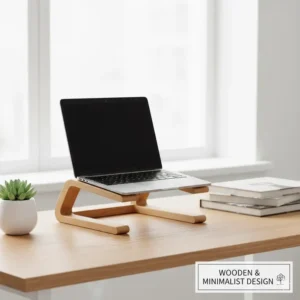
🛠️ Material & Aesthetics: Let’s face it, you bought a MacBook in part for its design. You probably want a stand that matches. Aluminum (the most common material) is a perfect match. Aluminum’s combination of light weight and high strength makes it an ideal material for this.
-
🧘 Your Body: Are you taller or shorter than average? A fixed stand might not work. An adjustable stand gives you the power to put the screen exactly where your eyes are.
Requirements Analysis by User Profile
| User Profile | Primary Need | Recommended Stand Type | Top Product Picks |
| The Corporate Professional (Home Office) | Ergonomics & Aesthetics | Fixed or High-End Adjustable | Rain Design mStand, Twelve South Curve SE |
| The Digital Nomad (Remote Worker) | Portability & Adjustability | Portable | Nexstand K2 |
| The Power User (Video Editor, Coder) | Cooling & Space | Vertical or Fixed | Twelve South BookArc, Rain Design mStand |
| The Student (Dorm/Library) | Portability & Value | Portable or Budget Fixed | Nexstand K2, Lamicall Laptop Stand |
| The Ergonomic Enthusiast | Max Adjustability | Fully Adjustable | Nulaxy Laptop Stand, ObVus Tower |
The “Complete Desk” Philosophy
Here’s the critical piece of advice that many people miss: a macbook computer stand is only half the solution.
When you raise your laptop, the built-in keyboard and trackpad become unusable (unless you enjoy typing like a T-Rex). You must pair your stand with an external keyboard and an external mouse or trackpad. This is what allows you to achieve true ergonomic separation:
-
Screen at eye level (thanks to the stand).
-
Keyboard at elbow level (thanks to the external keyboard).
This “holy trinity”—stand, keyboard, mouse—is the key to a pain-free and productive workspace. Don’t just buy a stand; plan to complete the setup.
Cost Comparison: Building Your Ergonomic Setup
| Component | Budget Setup | Mid-Range Setup | Pro Setup (Clamshell) |
| The Stand | Lamicall Laptop Stand | Nulaxy Laptop Stand | Twelve South BookArc |
| The Keyboard | Logitech K380 | Keychron K2 | Apple Magic Keyboard |
| The Mouse | Logitech M350 | Logitech MX Master 3S | Apple Magic Trackpad |
| (Optional) Monitor | N/A | N/A | 27-inch 4K Monitor |
| Est. Total (Ex. Monitor) | $80 – $120 | $200 – $250 | $300 – $350+ |
Performance Metrics: Before vs. After a Stand
| Metric | Before (Flat on Desk) | After (Stand + Ext. Keyboard) |
| Posture Score (Self-Reported) | 3/10 | 9/10 |
| Desk Clutter Score | 4/10 | 8/10 |
| Typing Comfort (2+ hours) | Low | High |
| Work-Related Pain (Neck/Back) | Common | Rare |
✨ Find Your Perfect Macbook Stand Today! 🛒
Don’t wait for the neck pain to set in. Browse the top-rated stands we’ve reviewed, find the one that fits your life, and take the first step toward a healthier, more productive workstation. Click any product link to see the latest details!
Conclusion: Your Workspace, Elevated
Choosing a macbook computer stand is more than just picking a desk accessory. It’s a fundamental upgrade to your health, comfort, and productivity. By elevating your screen to eye level, you’re not just saving your neck from pain; you’re creating a more focused, professional, and organized workspace.
Whether you opt for the iconic, rock-solid Rain Design mStand, the “go-anywhere” portability of the Nexstand K2, or the ultimate space-saving Twelve South BookArc for your desktop setup, the right stand for macbook is waiting for you.
You’ve invested in a premium laptop; now it’s time to invest in the accessory that unlocks its full ergonomic potential.
Frequently Asked Questions
❓ Is a macbook stand worth it for posture?
❓ What's the best macbook stand for a 16 inch Pro?
❓ Can a laptop stand damage my macbook?
❓ What's the difference between a vertical vs horizontal macbook stand?
❓ Should I get a fixed or adjustable macbook stand?
Recommended for You
- Dual Laptop Stand: 7 Best Picks Transform Your Desk 2025
- Double Laptop Stand: 7 Best Picks for Ultimate Productivity
- Tripod Stand Laptop: 7 Best Portable Stands for 2025
Disclaimer: This article contains affiliate links. If you purchase products through these links, we may earn a small commission at no additional cost to you.
✨ Found this helpful? Share it with your friends! 💬🤗
[addtoany]
